 MyTripAdmin
MyTripAdmin
MyTripAdmin
MyTripAdmin is the office in your pocket for South African owner-drivers who run their own shuttle business. Book the trip in seconds, see your day at a glance, and get a branded PDF invoice onto WhatsApp before the boot is closed.
Free for 5 trips a month · no card needed · works on the phone you already have
Why it exists
Bookings arrive on WhatsApp, the diary lives in your head, and invoices happen at the kitchen table at 22:00 — if they happen. Every forgotten fare and every "I'll pay you Friday" that slips through is your money, gone quietly.
MyTripAdmin keeps the whole story in one place: who you're driving, when, for how much, who still owes you — and it does it one-handed, outdoors, in a hurry, because that's where a driver actually works.
How it works
Pick the client — or add one right there — set pickup, drop-off, time and fare. If another booking sits within six hours, you're warned before you double-book.
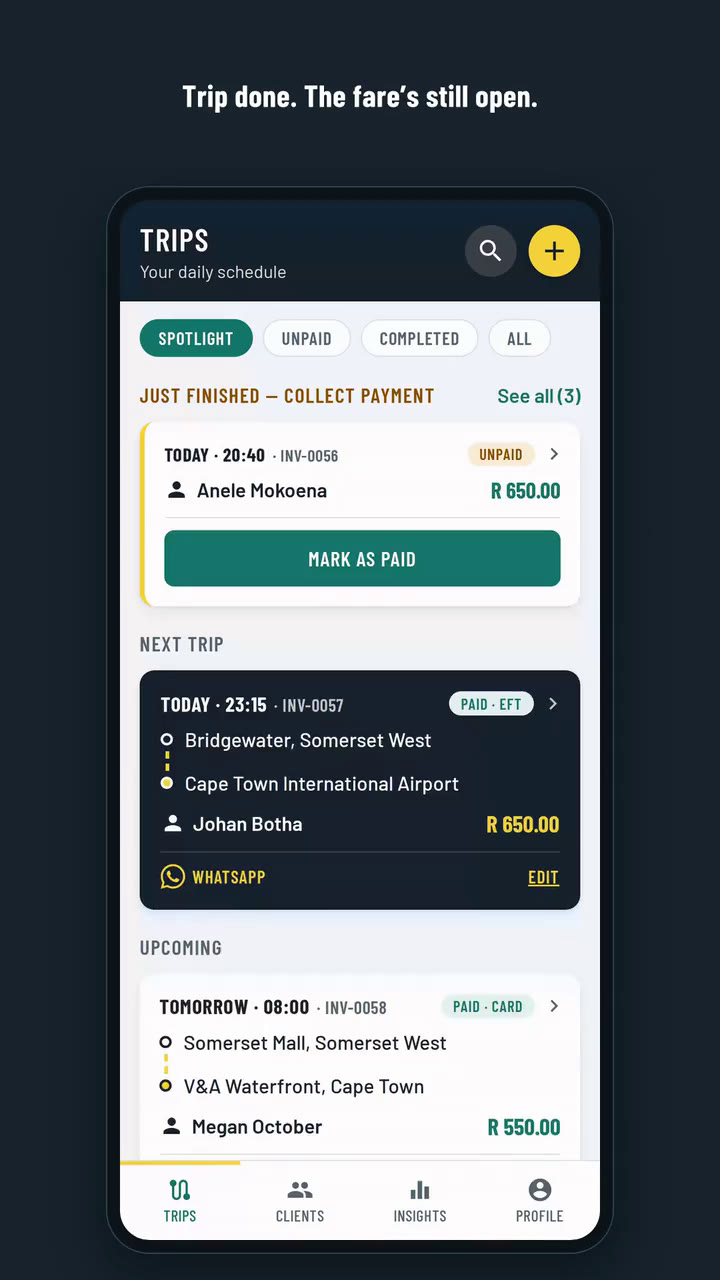
The Trips screen leads with your next pickup: route, time, passenger, fare. WhatsApp the passenger from the card. Tomorrow queues up underneath.
Every trip carries a branded PDF invoice with your banking details on it. Mark it paid in one tap — EFT, card or cash — and the Unpaid tab chases what's left.

Built for the driver's seat
Next trip first, big and unmissable — then everything upcoming, and the just-finished trips still waiting on payment.
Branded PDF invoices with your EFT details, shared in two taps. Company details, VAT number and vehicle on there when you want them.
The passenger pays — or their company does, or a parent covering the trip. The invoice bills the right party every time.
The Unpaid tab totals what's outstanding, shows who must pay each fare, and settles a trip in one tap without opening it.
Search by name, cell or email. Cell numbers are checked properly, so the WhatsApp button always reaches a real phone.
Works in the browser, installs to your home screen, and keeps up with new versions by itself. Light and dark — like this page.
See it


Pricing
R99/month
Unlimited trips & invoices. Cancel anytime — you keep access to the end of what you've paid for.
Go monthlyR999/year
Unlimited everything, one payment for the year. Secure checkout via PayFast.
Go yearlyYour data
The passengers and clients you add are your business records. Under POPIA you’re responsible for them and we work on your instructions: we use them only to run your diary and invoices, never contact them and never sell them.
Every company sees only its own trips, clients and invoices. Anyone you invite to help shares your records, and nobody else’s.
If we open one of your trips to help you, it’s recorded who opened it and when, and you can ask us for that record.
Subscription payments go through PayFast. We never see or store your card number.
The app and its database run on HostAfrica servers in South Africa. Invoice PDFs and backups are stored with Cloudflare, and the Privacy Policy names everyone who helps us run the service.
Download all your data as spreadsheets whenever you like. Delete your account yourself in the app. It stops your subscription and erases your clients, trips and invoices straight away. Our own invoices to you stay, because tax law requires them, and backup copies are deleted within 90 days.
Where it’s stored, who helps us run the service and how long anything is kept: read the Privacy Policy.
Questions
The free plan covers 5 new trips a calendar month, each with its invoice. The sixth is refused with the date your allowance comes back, which is the 1st of next month.
Everything else keeps working: editing trips, sending invoices, Mark as paid, Insights. Nothing is deleted or locked. A cancelled trip still uses its slot, and the 5 are shared by everyone on your account.
Yes, in the browser on both. Add it to your home screen and it opens full screen like an app and updates itself. It isn’t on Google Play or the App Store yet.
Partly. Once you’ve used it on your phone, it opens without signal and you stay signed in, but seeing and saving trips needs a connection. A banner tells you when you’re offline and clears itself when you’re back.
Not yet: booking a trip while offline. Save it once you have signal.
Yes. MyTripAdmin is built for the driver who runs the business, and you can invite someone to help, like a partner who captures bookings or sends the invoices. They get their own login and work from the same trips, clients and invoices. Billing and the account stay with you.
Got more than one vehicle? Add them all and pick which one did each trip.
Banking details, yes. Add one or more accounts under Profile › Billing, tick EFT under Ways to pay, and they’re printed on every invoice with the invoice number as the payment reference. Your company name, slogan, contact details and VAT number are on there too.
Not yet: your logo. The invoice header shows your company name in the MyTripAdmin design.
Never. You send the invoice from your own phone: Send invoice opens your phone’s share options with the PDF attached, and you pick WhatsApp or email. It reaches your client from you, in your own chat.
No. Your passengers pay you directly, the way they do now: cash, card or EFT. The money never passes through us. You mark the trip paid in one tap, and a promised transfer stays on the Unpaid tab as Pending EFT until the money’s in.
Not yet. Your VAT number, and the paying company’s, are printed on the invoice, but the app doesn’t calculate VAT and the PDF is titled “Invoice”, not “Tax invoice”.
Yes. Set your invoice prefix and the next number in Profile, and new invoices carry on from your old system.
No, and it isn’t planned: each trip is booked on its own. A regular is quick to book, though. Pick the passenger and the places they’ve used before come up first, so their trip takes a few taps.
Yes. Sign in on as many phones, tablets and computers as you like.
The account owner cancels in the app under Profile › App › Cancel subscription. Payments stop at PayFast straight away, and you keep your plan to the end of the period you’ve paid for. Then you’re back on the free plan, with nothing deleted. There’s no contract and no notice period. See the Refund & Cancellation Policy.
Yes. The account owner can download everything (trips, clients, companies, vehicles and bank details) as spreadsheets under Profile › App › Your data. They open in Excel or Google Sheets. Invoice PDFs download one at a time from each trip.
WhatsApp Krialex Support on 063 571 0884, or log a call in the app under Profile › Support and we’ll reply there.